
Resume Tips 10 min read

Writing an ATS-Friendly Resume in 2026: The Complete Guide - A Comprehensive Guide to Modern Tools

Learn how to create an ATS-friendly resume in 2026 that passes applicant tracking systems and gets noticed by recruiters.

Ijaz Ahmad
Ijaz Ahmad
Published Jul 23, 2026
Featured Image
A professional workspace showcasing modern web development techniques. Image via Unsplash.

Finding the right job is more competitive than ever. Every day, employers receive hundreds or even thousands of applications for a single position. To manage this volume efficiently, most companies rely on Applicant Tracking Systems (ATS) to screen resumes before a recruiter ever sees them.

This means your resume must impress two audiences: the ATS software and the hiring manager. Even if you have excellent qualifications, your application may never reach a recruiter if your resume is not optimized for automated screening.

An ATS scans resumes for relevant keywords, job titles, technical skills, certifications, education, and work experience. It then ranks candidates based on how closely their resumes match the job description. A well-structured, keyword-optimized resume increases your chances of passing this initial screening.

The good news is that creating an ATS-friendly resume does not require expensive software or advanced design skills. With the right formatting, clear language, and strategic keyword placement, you can build a resume that works effectively for both automated systems and human recruiters.

In this guide, you'll learn how ATS software works, the essential elements of an ATS-friendly resume, common mistakes to avoid, and practical strategies to improve your chances of landing interviews in 2026.

What is an Applicant Tracking System (ATS)?

An Applicant Tracking System is software used by employers to collect, organize, and evaluate job applications. Instead of reviewing every resume manually, recruiters use ATS platforms to filter applications based on predefined requirements.

The system analyzes information such as: Job titles, Technical skills, Certifications, Education, Years of experience, Keywords from the job description, Work history, and Contact information.

Resumes that closely match the employer's requirements are more likely to be shortlisted for human review.

Why ATS-Friendly Resumes Matter

Many job seekers focus only on making their resumes visually attractive. While good design is important, readability and compatibility with ATS software are even more critical.

An ATS-friendly resume offers several advantages:

  • Improves visibility during automated screening
  • Increases the chances of being shortlisted
  • Helps recruiters quickly identify relevant qualifications
  • Highlights your technical and professional skills effectively
  • Creates a professional first impression
  • Saves recruiters time by presenting information clearly
How an ATS Works
How Applicant Tracking Systems filter and rank resumes.

How ATS Software Evaluates Your Resume

Understanding how ATS software works can help you tailor your resume more effectively.

1. Resume Submission

You upload your resume through the company's careers page or a job portal.

2. Information Parsing

The ATS extracts important information, including your name, contact details, education, experience, and skills.

3. Keyword Matching

The system compares your resume with the job description and looks for matching keywords and phrases.

4. Candidate Ranking

Applicants receive a relevance score based on how well their resumes match the job requirements.

5. Recruiter Review

The highest-ranked resumes are typically forwarded to recruiters for manual evaluation.

Essential Sections of an ATS-Friendly Resume

A professional resume should include the following sections: Contact Information, Professional Summary, Technical Skills, Work Experience, Projects, Education, Certifications, Achievements, and Languages (if relevant).

Using clear section headings helps both ATS software and recruiters understand your qualifications quickly.

ATS-Friendly Resume Format
Standard formatting guidelines for ATS-compliant resumes.

Resume Formatting Best Practices

An ATS-friendly resume should be simple, organized, and easy for both software and recruiters to read. Follow these formatting best practices:

  • Use professional fonts such as Arial, Calibri, Helvetica, or Times New Roman.
  • Keep the font size between 10 and 12 points for body text.
  • Use clear section headings like Education, Skills, Projects, and Experience.
  • Maintain consistent spacing throughout the document.
  • Save your resume as a PDF unless the employer specifically requests another format.
  • Use standard bullet points instead of symbols or icons.
  • Avoid tables, text boxes, headers, footers, and multiple columns, as some ATS software may not read them correctly.

Using the Right Keywords

Keywords are one of the most important factors in ATS screening. Recruiters often configure the system to search for specific skills, tools, certifications, and job titles that match the role.

Before submitting your application: Carefully read the job description, Highlight important technical skills, Identify repeated keywords, and Include those keywords naturally in your resume.

For example, if a Software Engineering position mentions: Java, Python, React, REST APIs, SQL, Git, Docker, AWS—your resume should include these skills if you genuinely possess them.

Writing Strong Experience Bullet Points

Your work experience should describe not only what you did but also the impact of your work. Employers appreciate measurable achievements.

Instead of writing: Developed a website. Write: Developed a responsive e-commerce website using React, Node.js, and MySQL, improving page load speed by 35% and supporting secure online payments.

Using action verbs such as developed, implemented, optimized, designed, automated, and improved makes your accomplishments more compelling.

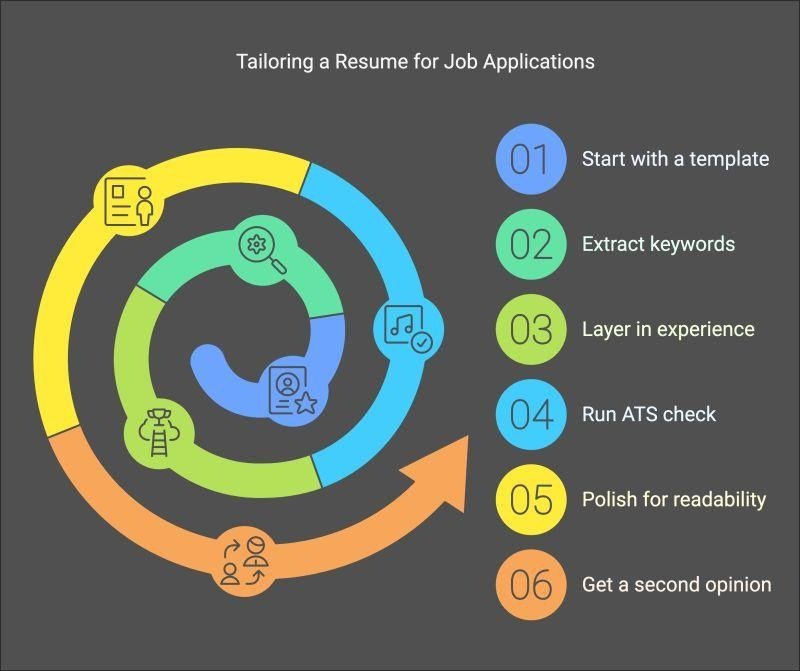
Resume Optimization Process
Optimizing bullet points with keywords and action verbs.

Common ATS Resume Mistakes to Avoid

Many qualified candidates miss interview opportunities because of avoidable resume mistakes. Some of the most common errors include: Using overly decorative templates, Including graphics, charts, or icons that ATS software cannot interpret, Writing long paragraphs instead of concise bullet points, Using vague job descriptions without measurable achievements, Spelling mistakes and grammatical errors, Listing outdated or irrelevant skills, Forgetting to include important keywords from the job description, Using unprofessional email addresses, and Submitting the same resume for every job application.

Using AI to Improve Your Resume

Artificial Intelligence has become a valuable tool for resume writing. AI-powered platforms can help improve grammar, rewrite bullet points, suggest stronger action verbs, and identify missing keywords.

AI can assist with: Resume proofreading, Grammar correction, Keyword optimization, Professional summaries, Achievement-focused bullet points, and Formatting suggestions.

Resume Tips for Software Engineers

Software engineering resumes should emphasize practical technical experience alongside education. Include sections such as Technical Skills, Projects, and a link to your GitHub Portfolio.

Optimize Your LinkedIn Profile: Ensure your LinkedIn profile includes a professional photo, clear headline, strong "About" section, updated work experience, and technical skills. Recruiters often review LinkedIn profiles before scheduling interviews.

Job Application Success Roadmap
A comprehensive roadmap to resume success.

ATS Resume Checklist

Before submitting your application, ask yourself the following questions: Is my resume tailored to this specific job? Have I included important keywords from the job description? Is the formatting simple and ATS-friendly? Have I highlighted measurable achievements? Is my contact information accurate? Are there any spelling or grammar mistakes? Have I updated my latest projects and certifications? Does my resume fit within one or two pages? Have I included links to my LinkedIn and GitHub profiles where appropriate?

Frequently Asked Questions (FAQs)

Should I customize my resume for every job?

Yes. Tailoring your resume to match the job description increases the likelihood of passing ATS screening and catching a recruiter's attention.

How long should my resume be?

For students and early-career professionals, one page is often sufficient. Experienced professionals may use two pages if necessary.

Is a PDF the best format?

In most cases, yes. However, always follow the employer's instructions if they request a Word document or another file format.

Do recruiters actually use ATS software?

Yes. Many medium and large organizations use Applicant Tracking Systems to manage large volumes of applications efficiently.

Comments

Leave a Reply

No comments yet. Be the first to share your thoughts!

Share this Article
Ijaz Ahmad

Ijaz Ahmad

Career Coach & Tech Writer & Educator

Ijaz is a passionate software engineer with over 10 years of experience building scalable web applications. He loves sharing his knowledge through comprehensive guides and tutorials.

Frequently Asked Questions

No, this guide starts from the basics and progresses to advanced topics suitable for all levels.

Most tools have robust free tiers perfect for learning and small projects.

With consistent practice, you can grasp the fundamentals in a few weeks.