
Deploying On Aws Career Quick Facts (Global 2026)
Indicative Salary Ranges:
While compensation varies heavily by region and employer, these are typical illustrative ranges for Deploying On Aws roles.
| Role Level | Example Remote Range (USD/yr) |
|---|---|
| Junior / Associate | $40,000 – $75,000 |
| Mid-Level | $70,000 – $110,000 |
| Senior / Lead | $120,000+ |
Table of Contents
1. What Is AWS? 2. Understanding Cloud Computing 3. Why Businesses Choose AWS 4. What Does "Deploying an Application" Mean? 5. Types of Applications You Can Deploy on AWS 6. Understanding the AWS Global Infrastructure 7. Popular AWS Services Every Beginner Should Know 8. Benefits of Learning AWS as a Student 9. AWS Free Tier 10. Common Industries Using AWS 11. Creating an AWS Account 12. Understanding the AWS Management Console 13. Hosting a Static Website on AWS 14. Deploying Dynamic Applications 15. Amazon EC2 in Practice 16. Connecting a Domain Name 17. Understanding DNS 18. Managing Application Storage 19. Monitoring Applications 20. Logging and Troubleshooting 21. Security Best Practices 22. Backup and Disaster Recovery 23. Scaling Applications 24. Cost Management 25. Common Deployment Mistakes 26. Popular AWS Certifications 27. Career Opportunities After Learning AWS 28. Best Practices for BeginnersSo, you've built an amazing app congratulations! But in today's digital world, just developing it isn't quite enough, right? Once your website, web app, or software project is finally done, your next big step is actually getting it out there for the world to see. We call this process "deployment," and when it comes to deploying your hard work, Amazon Web Services (AWS) is easily one of the most trusted platforms you can use.
Whether you're hosting a small personal portfolio or a massive global streaming platform with millions of users, AWS has your back. You'll find start-ups, schools, government agencies, hospitals, and even Fortune 500 companies relying on it every single day. Why? Because it's incredibly scalable, super reliable, and packed with an amazing range of cloud services.
If you're a student, an aspiring software engineer, or even a seasoned developer, understanding AWS is honestly becoming just as crucial as learning a new programming language. In fact, many employers these days fully expect you to have at least a basic grasp of cloud computing and how deployment actually works.
That's exactly why we've put together this practical, beginner-friendly guide to AWS. We're going to break down what AWS actually is, why so many companies love it, how cloud deployment works, and the essential services you'll definitely run into as you kick off your cloud journey.
What Is AWS?
Amazon Web Services (AWS) is essentially Amazon's massive cloud computing platform. It gives you access to hundreds of on-demand services for things like computing, storage, databases, networking, AI, security, analytics, and honestly, so much more.
Instead of going out and buying expensive physical servers and dealing with the headache of maintaining your own data center AWS lets you simply rent the computing resources you need, exactly when you need them.
You can think of AWS as a giant, global network of highly secure data centers. As a developer, you can spin up virtual servers, store files, build databases, and deploy your apps in just minutes. Best of all? You only pay for what you actually use.
It's this kind of incredible flexibility that has completely transformed how we build and deliver modern software.
Understanding Cloud Computing
Before we dive deeper into AWS, let's take a moment to really understand what "cloud computing" means.
Back in the day, companies had to buy clunky, physical servers and cram them into their offices or dedicated server rooms. Setting these up was a huge hassle because they constantly required:
- Hardware maintenance
- A ton of electricity
- Complex cooling systems
Security
- Constant network management
- Endless regular hardware upgrades
Cloud computing completely takes away all that exhausting complexity.
Instead of owning all that physical hardware yourself, you just rent the computing power you need from a cloud provider like AWS. You can scale these resources up or down in seconds depending on your actual demand, which makes cloud computing incredibly cost-effective and perfectly scalable for whatever you're building.
Why Businesses Choose AWS
So, why exactly has AWS become the go-to cloud platform for so many businesses around the world? Let's break it down.
Reliable Infrastructure
AWS runs massive data centers all over the planet. Because of this global reach, you can rest easy knowing your applications will stay up and running, even if a specific server somewhere runs into a hiccup.
Scalability
One of the absolute best things about AWS is how easily it scales with your needs.
Let's say you have a small blog:
Normally, you might just get a few hundred visitors a day.
But what if one of your posts goes viral, and your traffic suddenly explodes?
AWS lets you instantly dial up your resources to handle the rush, and you won't ever have to worry about buying new hardware.
Security
We all know how crucial security is, and AWS treats it as a top priority.
They hook you up with powerful tools for things like:
- Identity management
- Encryption
- Network protection
- Data backup
- Access control
- Compliance monitoring
With these built-in features, keeping your sensitive data safe and meeting tough industry standards becomes so much easier.
Global Availability
Because AWS has servers in practically every corner of the globe, you're always covered.
You can choose to deploy your apps right next door to your users. This dramatically cuts down on lag and gives your users a blazing fast experience.
Wide Range of Services
AWS isn't just about simple hosting; it offers hundreds of specialized tools right at your fingertips, including:
- Computing
- Storage
- Databases
- Networking
- Artificial Intelligence
- Machine Learning
- Internet of Things (IoT)
- DevOps
Security
- Analytics
As your business grows, AWS grows with you. You'll never have to deal with the headache of migrating to another provider just to find the tools you need.
What Does "Deploying an Application" Mean?
You hear the word "deployment" a lot, but what does it actually mean? Simply put, it's the magical step where you finally make your application available for real people to use.
Think about it like this:
You spend weeks coding a beautiful website on your laptop.
But right now, you're the only person in the world who can see it.
Once you deploy it to AWS, everything changes:
Anyone on the internet can now visit your site.
Your application stays up and running 24/7.
You can push out fresh updates in a snap.
You can easily track how well your app is performing.
And you can wrap it all in robust security measures.
Basically, deployment takes your quiet little local project and turns it into a living, breathing online service.
Types of Applications You Can Deploy on AWS
You might be wondering, "What exactly can I build and host on AWS?" The short answer: almost anything.
Here are just a few great examples:
- Sleek personal portfolios
- Professional company websites
- Your brand new blog
- Busy e-commerce storefronts
- Interactive learning management systems
- Lightning-fast REST APIs
- Powerful mobile app backends
- Real-time chat applications
- Cutting-edge AI services
- Heavy-duty data analytics platforms
Whether you're just finishing up a fun weekend project for university or architecting a massive enterprise application, AWS has the perfect set of tools to bring your ideas to life.
Understanding the AWS Global Infrastructure

The secret sauce behind AWS is its incredibly smart, globally distributed infrastructure.
To really get how it works, you just need to understand a few key concepts.
Regions
Think of a "Region" as a specific spot on the map that houses a cluster of AWS data centers.
You'll find these regions all over the place North America, Europe, Asia Pacific, the Middle East, Africa, South America, you name it.
Pro tip: always try to pick a region that's geographically closest to your users. It dramatically cuts down loading times and makes your app feel incredibly snappy.
Availability Zones
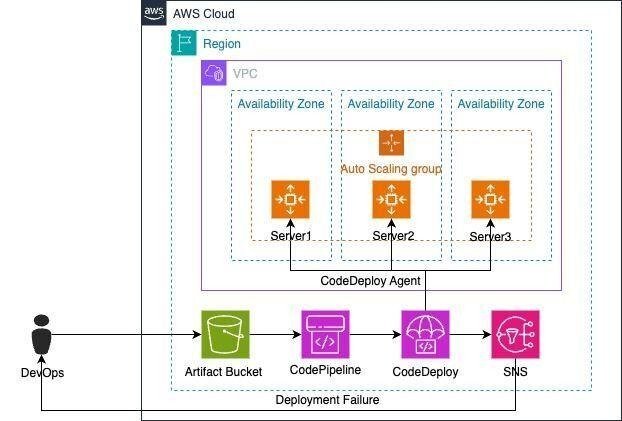
Inside every single region, AWS has what they call "Availability Zones" (or AZs).
These are completely separate physical facilities that are tightly linked together by super-fast networking.
Why does this matter? By spreading your application across multiple AZs, you're practically bulletproofing it. If one facility goes offline for some reason, your app just seamlessly fails over to another zone and keeps right on running.
Edge Locations
AWS also scatters "Edge Locations" all around the world to deliver your content at lightning speeds.
These locations act as caches. They store copies of your most popular files like heavy images, videos, and static web assets right in your users' backyards, drastically reducing load times for everyone.
Popular AWS Services Every Beginner Should Know
Looking at the massive list of AWS services can be a little overwhelming at first. Don't worry you only need to focus on a few key heavy-hitters when you're just starting out.
Amazon EC2
Amazon Elastic Compute Cloud, or EC2, is basically your virtual server in the cloud.
Instead of running out to buy a physical computer, you can just spin up a virtual machine right from your browser. You can use it to run your websites, host complex applications, manage databases, or power your backend services.
The best part? EC2 gives you absolute control. You get to pick the operating system, install exactly the software you want, and tweak the environment perfectly to your liking.
Amazon S3
Amazon Simple Storage Service (S3) is your go-to place for storing files safely in the cloud.
You can use it for all sorts of things, like:
- Hosting website images
- Streaming videos
- Storing important documents
- Keeping safe application backups
- Hosting completely static websites
- Archiving your log files
S3 is legendary for being incredibly durable and infinitely scalable, which is exactly why almost everyone on AWS uses it.
Amazon RDS
Managing databases yourself can be a nightmare. That's where Amazon Relational Database Service (RDS) comes in.
Instead of dealing with the headaches of manual installations and maintenance, AWS handles all the boring stuff for you like automatic backups, software updates, and constant monitoring.
Plus, it supports all your favorite database engines out of the box, including MySQL, PostgreSQL, MariaDB, Oracle Database, and Microsoft SQL Server.
AWS Lambda
Want to just write code and completely forget about servers? Say hello to AWS Lambda.
This is what we call "serverless computing."
With Lambda, your code only springs into action when a specific event triggers it. It's an unbelievably efficient and cost-effective way to power modern applications.
Amazon CloudFront
CloudFront is AWS's blazing fast content delivery network (CDN).
It takes your website's heavy content and caches it at edge locations all over the globe, ensuring that your users get a lightning-fast experience no matter where they live.
Benefits of Learning AWS as a Student
If you're looking to stand out in the tech world, mastering cloud computing is an absolute superpower.
Diving into AWS will empower you to:
Build impressive, modern software projects from scratch.
Deeply understand how real-world cloud architectures actually work.
Make your portfolio shine to potential employers.
Nail your upcoming internship interviews.
Get ready for highly respected cloud certifications.
Dramatically boost your chances of landing a great job.
Get comfortable with the exact tools the pros use every day.
It's no surprise that universities everywhere are now baking cloud computing right into their computer science programs it's exactly what the industry demands today.
AWS Free Tier
I know what you're probably thinking: "Isn't playing around in the cloud going to cost me a fortune?"
Good news! AWS offers an amazing Free Tier, designed specifically to let you explore their most popular services without breaking the bank.
You can use it to practise deployments, host your own small websites, and run fun experiments completely for free. You just need to keep a close eye on their usage limits to make sure you don't accidentally overstep.
Taking full advantage of the Free Tier is honestly the smartest way to get your hands dirty before you tackle the big production projects.
Common Industries Using AWS
You might be surprised to learn just how many different fields rely on AWS every single day.
We're talking about massive sectors like:
- Banking and high-stakes finance
- Crucial healthcare systems
- Schools and educational platforms
- Your favorite retail and e-commerce sites
- Global entertainment and streaming media
- Government agencies
- Heavy manufacturing
- Telecommunications networks
- Massive multiplayer gaming worlds
- Groundbreaking scientific research
Because AWS is so flexible, these organizations can easily snap together custom solutions that fit their exact needs like a glove.
Creating an AWS Account
Ready to jump in? Your cloud adventure starts with creating your very own AWS account.
Signing up is pretty straightforward; you'll just need:
- Your name and a reliable email address
- A strong, secure password
- Your basic contact details
- A credit or debit card (don't worry, this is just to verify you're a real person)
- A quick phone verification
Even though you get that fantastic Free Tier we talked about, I highly recommend setting up billing alerts right away so you never get hit with a surprise charge.
Once you're all set up, you'll unlock the AWS Management Console your mission control for absolutely everything in the cloud.
Understanding the AWS Management Console
When you first log in, you'll land in the AWS Management Console. Think of this as your sleek, web-based cockpit for controlling all your cloud resources.
Right from this dashboard, you have the power to:
- Spin up new virtual servers
- Build out your storage buckets
- Configure and tweak databases
- Set up complex networking rules
- Keep a close eye on how your apps are performing
- Check your billing and usage
- Lock down your security settings
- Dive into hundreds of specialized services
I won't lie it can look pretty intimidating the very first time you see it. But trust me, as you spend more time playing around, you'll feel right at home with your favorite tools in no time.
Hosting a Static Website on AWS

If you're looking for the perfect beginner project, hosting a static website is definitely the way to go.
A static site is just a collection of simple files like:
- HTML for your structure
- CSS to make things look beautiful
- JavaScript for some fun interactivity
- Your images
- Custom fonts
Because there's no complex server-side code (like PHP or Node.js) to run, deploying these is a breeze.
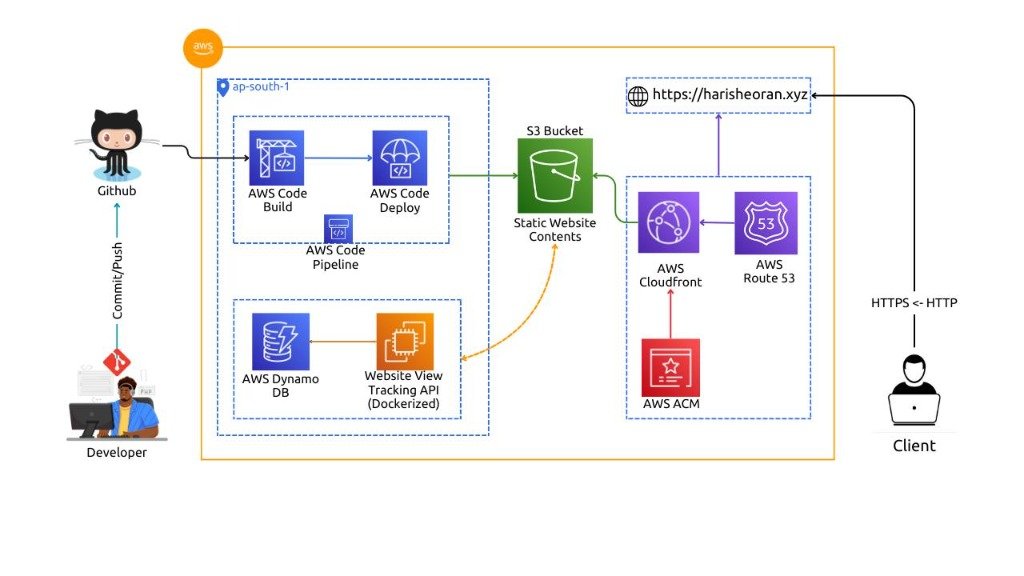
AWS lets you host static sites incredibly easily using Amazon S3.
All you have to do is upload your files to an S3 bucket, flip a switch to turn on static website hosting, and boom your site is live for the whole world to see.
It's the absolute best approach for hosting:
- Your personal portfolio
- Marketing landing pages
- Clean company websites
- Technical documentation
- Your latest student projects
Deploying Dynamic Applications
Once you're comfortable with static sites, you'll probably want to deploy a dynamic application apps that change and generate content based on what your users are doing.
We're talking about things like:
- Bustling online stores
- Interactive learning platforms
- Full-featured blogging systems
- Your next big social network
- Live booking systems
Unlike simple static files, these kinds of projects usually need a bit more muscle under the hood:
- A dedicated web server
- A robust database
- Server-side languages processing the logic
- Secure user authentication
Thankfully, AWS gives you plenty of tailored deployment options to match exactly how complex your architecture needs to be.
Amazon EC2 in Practice
So, how does Amazon EC2 actually work in the real world? Basically, it lets you boot up virtual machines, which AWS calls "instances."
When you spin up a new EC2 instance, you get to play IT manager and choose your exact specs:
- Your preferred operating system (like Linux or Windows)
- The instance size (how much CPU and RAM you need)
- Your storage capacity
- Your specific security rules
- How you want your network set up
Once your instance is happily humming along, the machine is entirely yours. You can log in and install whatever you want, including:
- Web servers like Apache or Nginx
- Node.js environments
- Python or PHP runtimes
- Java environments
- Your own databases
- Any custom application code you can dream up
That level of complete freedom is exactly why developers rely on EC2 for practically every type of project imaginable.
Connecting a Domain Name
Let's be honest, nobody wants to share a website link that looks like a random string of numbers. That's why custom domains are essential.
For example:
- Instead of sending your friends to an ugly IP address like:
- http://123.45.67.89
You want them typing in something catchy, like:
- www.yourcoolproject.com
AWS makes it super simple to hook up your own custom domain names directly to your hosted apps.
Having a professional-looking domain does wonders for you:
- It instantly boosts your brand recognition
- It builds trust with your visitors
- It helps you rank much higher on Google
- It's just way easier for people to remember!
Understanding DNS
Ever wonder how typing a domain name magically takes you to the right server? Meet DNS, the Domain Name System. Think of it as the ultimate phonebook for the internet.
As humans, we're great at remembering names.
But computers? They only speak in numbers (IP addresses).
DNS acts as the brilliant translator in the middle, converting those friendly domain names you type into the exact numerical IP addresses the computers need to talk to each other.
Imagine if we didn't have DNS you'd have to memorize a long string of numbers just to check your email or watch a video!
Managing Application Storage
Let's talk about storage. Almost every modern app needs a rock-solid place to keep files.
I'm talking about things like:
- Your users' profile photos
- Important PDF documents
- Heavy video files
- Crucial daily backups
- Your app's system logs
- Generated data reports
Amazon S3 is hands down the easiest way to handle all of this. It gives you secure, virtually unlimited storage that scales effortlessly, whether you're building a tiny personal tool or a huge enterprise system.
Because S3 is incredibly reliable and almost never goes down, it's easily the top choice for developers all over the world.
Monitoring Applications
Here's a secret: deploying your app isn't the finish line; it's just the beginning.
If you want your app to succeed, you need to keep a close eye on it out in the wild.
AWS gives you some fantastic tools to monitor exactly what's happening under the hood, including:
- Overall server health
- How hard your CPU is working
- Your RAM consumption
- How fast your storage is filling up
- Spikes in network activity
- Pesky application errors
- How fast your pages are loading for users
By watching these metrics closely, you can spot and fix potential disasters long before your users ever notice a thing.
Logging and Troubleshooting
Every time someone uses your app, it quietly writes down what happened in a file called a log.
These logs are an absolute goldmine of information, recording things like:
- Every single user request
- Hidden errors that silently crash things
- Failed login attempts (great for spotting hackers!)
- Important background system events
- Rich performance data
When things break and they always do diving into these logs is how you save the day. They help you:
- Squash stubborn bugs
- Tighten up your security
- Figure out why your app is running slowly
- Truly understand how people are interacting with your platform
Trust me, getting comfortable with reading and understanding logs will make you an infinitely better cloud engineer.
Security Best Practices
You can never be too careful when putting your app out into the wild. Security has to be front and center.
Here are a few essential habits you should adopt right now:
Use Strong Passwords
Please, step away from "password123." Always use a password manager to generate unique, complex passwords for all your cloud accounts.
Enable Multi-Factor Authentication (MFA)
Turning on MFA is an absolute must. It adds a powerful extra layer of defense on top of your password.
If a hacker somehow guesses your password, they're still blocked unless they also have your phone for that second verification step.
Follow the Principle of Least Privilege
Don't just hand out admin access to everyone. Only give your teammates the exact permissions they need to do their jobs.
Keeping access tightly controlled seriously minimizes the chances of accidental deletions or malicious attacks.
Keep Software Updated
Never ignore those update notifications! Regularly patching your operating systems, frameworks, and libraries is the easiest way to close security loopholes before hackers find them.
Encrypt Sensitive Information
Whether your data is just sitting in a database or traveling across the internet, you should always encrypt it. It ensures that even if someone intercepts your data, it just looks like gibberish to them.
Backup and Disaster Recovery
Let's face it: disaster can strike when you least expect it.
You always have to be prepared for nightmare scenarios like:
- Sudden hardware meltdowns
- A buggy code deployment that breaks everything
- A sleepy developer accidentally deleting a production database (it happens!)
- Malicious cyberattacks
- Crazy natural disasters taking down a data center
The only way to sleep soundly at night is by taking regular, automated backups. That way, if everything goes up in flames, you can just restore your app and keep moving.
Luckily, AWS gives you fantastic, automated backup and recovery tools so you can bounce back fast, no matter what goes wrong.
Scaling Applications
I mentioned it earlier, but AWS's ability to scale is honestly its real superpower.
Picture this: you launch an exciting new application.
For the first few weeks, it's just your friends and a few hundred early adopters checking it out.
But then, an influencer shares your app, and suddenly you have hundreds of thousands of people trying to log in all at once!
In the old days, your servers would crash. But with AWS, you just flip a switch to instantly add more computing horsepower and ride the wave seamlessly.
And the best part? When the hype dies down and traffic goes back to normal, AWS automatically scales everything back down so you aren't paying for power you don't need.
Cost Management
Let's talk about the bill. Being a great cloud engineer also means being responsible with costs.
AWS operates on a wonderful pay-as-you-go model.
You don't have to buy expensive servers upfront; you literally only pay for the exact compute time and storage space you use.
To keep your AWS bill from giving you a heart attack, try these simple habits:
Set up billing alerts and check your dashboard often.
Ruthlessly delete resources or old backups you no longer need.
Shut down virtual servers when you aren't actively using them.
Clean up your storage buckets.
And while you're still learning, keep a sharp eye on those Free Tier limits.
Learning how to optimize cloud costs early on is a huge resume booster and a skill every manager loves.
Common Deployment Mistakes
We all make mistakes when we're learning, but there are a few classic blunders you can easily avoid.
Keep these common pitfalls in mind when you start deploying:
Don't leave test servers running over the weekend (your wallet will thank you!).
Never leave your database completely open to the public internet.
Don't wait until a crash to realize you forgot to set up backups.
Stop using lazy passwords for your root accounts.
Don't fly blind set up monitoring so you know what your app is doing.
Always double-check your code in a staging environment before pushing it live.
Write down how you configured things; your future self will be so grateful.
And please, don't ignore those crucial software updates.
Taking a few extra minutes to plan your deployment properly will save you hours of panic later!
Popular AWS Certifications
Want to prove to the world that you know your way around the cloud? Grabbing an official AWS certification is a great way to do it.
Some of the most sought-after badges you can earn include:
- AWS Certified Cloud Practitioner (A great starting point!)
- AWS Certified Solutions Architect – Associate
- AWS Certified Developer – Associate
- AWS Certified SysOps Administrator – Associate
- AWS Certified DevOps Engineer – Professional
- AWS Certified Security – Specialty
- AWS Certified Machine Learning – Specialty
While having these certifications on your resume is fantastic, remember that nothing beats getting your hands dirty and building real, practical projects to show off your skills.
Career Opportunities After Learning AWS
Cloud computing isn't just a trend; it's practically the backbone of modern tech, and it's growing incredibly fast.
Once you get comfortable with AWS, a whole new world of exciting career paths opens up for you, like:
- Cloud Engineer
- DevOps Engineer
- Solutions Architect
- Site Reliability Engineer (SRE)
- Backend Developer
- Full-Stack Developer
- Cloud Security Engineer
- Systems Administrator
- Software Engineer
- Cloud Consultant
Tech companies everywhere are desperately hunting for people who actually understand how to deploy applications safely, automate infrastructure, and keep the cloud secure.
Best Practices for Beginners
Taking your first steps into AWS can feel a bit like drinking from a firehose, but stick to these tips and you'll be fine:
Don't try to learn everything at once just pick one service and master it.
Start small. Build simple, fun little projects first.
Squeeze every drop of value out of the AWS Free Tier (but watch those limits!).
Make a habit of reading the official AWS documentation; it's surprisingly helpful.
Brush up on your basic networking concepts it makes everything click faster.
Try your hand at deploying both static sites and dynamic web apps.
Learn your way around a Linux terminal; you'll use it constantly.
Take cloud security seriously from day one.
Write about your projects on a blog or in a README it's great for your portfolio.
And most importantly, just keep experimenting!
At the end of the day, logging in and actually building things will boost your confidence way faster than just reading another tutorial. You've got this!
Deploying On Aws Essential Resources
Ready to take the next step? Here are the most relevant and targeted resources specifically for Deploying On Aws: